



Check-in
Live attendance
Event Day shows how many tickets are checked in and how many are still to come. It updates as your door team scans or checks people in by hand.
How many people are in right now?
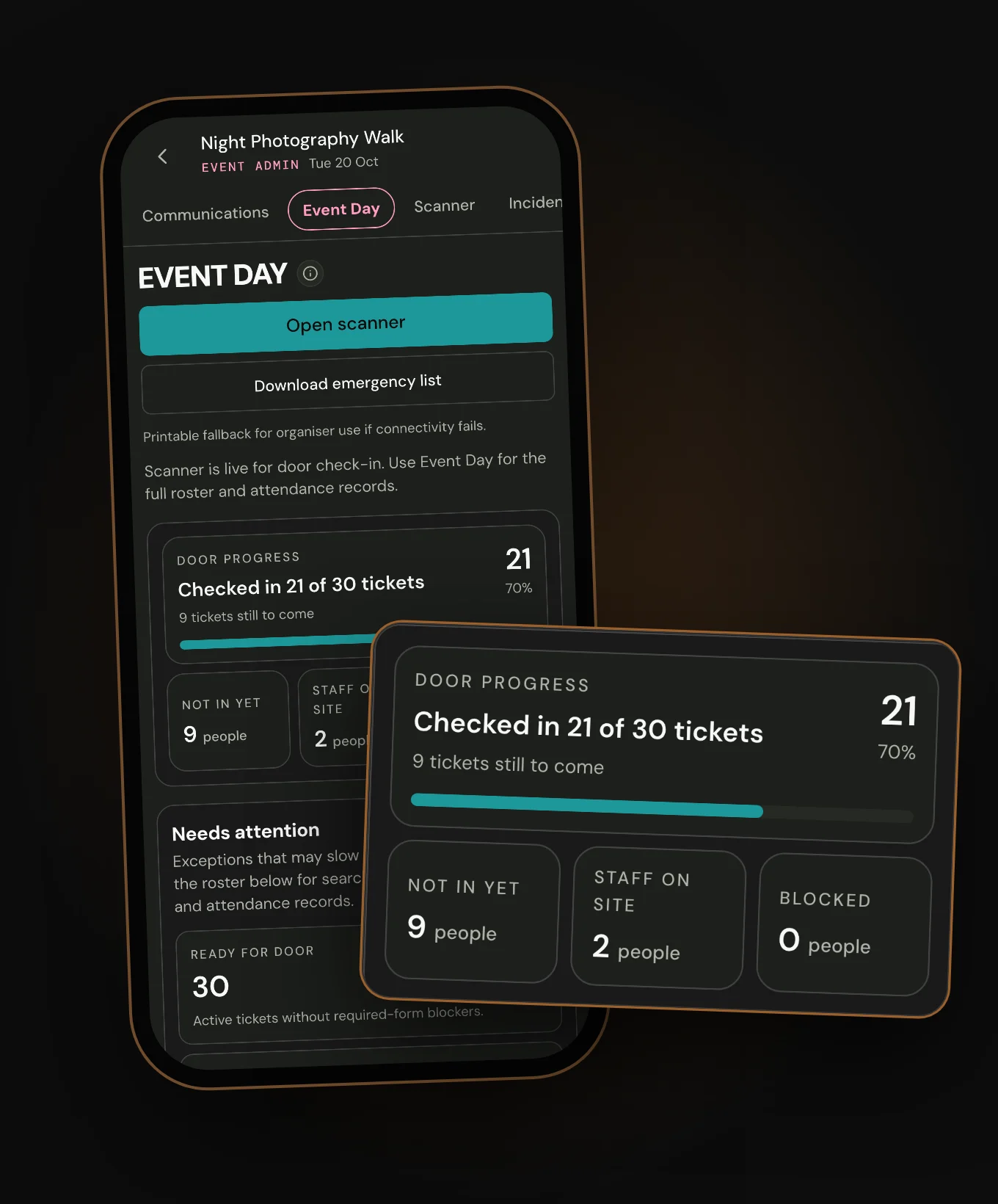
Event admin opens on Event Day, which takes that name 24 hours before the start. Door progress reads, for example, Checked in 21 of 30 tickets, with 9 tickets still to come.
- Door progress
- Tickets checked in, out of all valid attendee tickets. Refunded tickets and staff passes are left out.
- Not in yet
- People with a ticket who aren't checked in, including blocked people.
- Staff on site
- Event staff who've been checked in.
- Blocked
- People held up by unsigned forms or a transfer still waiting.
Each count says whether it counts people or tickets. Press any count to list the people behind it.
For an event set to check people in by hand, choose Mark Present beside a person in the list. Events that use scanning check tickets in through the scanner.
When does a check-in show on Event Day?
A scan with signal shows in a moment, as the page updates by itself. A check-in saved on a phone without signal shows once that phone sends it. It then carries the time it arrived, not the time of the scan.

A return noted with Let back in stays on the scanner. The person is still checked in once, so no count changes.
Who can see Event Day?
Staff with both View attendees and Scan tickets also get Open scanner. Email addresses on the roster show to Owners and Admins only.
- Hub owner, admin or manager
- The roster and every count, on every event in the hub.
- Event staff with View attendees
- The roster to read, and Download emergency list.
- Event staff with Scan tickets only
- No roster. The scanner and its search only.
What if the signal goes at the desk?
Event Day needs a connection, and it isn't saved on the phone. Before doors, press Download emergency list.
It saves a printable list of every ticket and staff member, sorted by name. Each row has a tick box, the ticket ref, the ticket type and whether they're checked in. Owners and Admins also get email addresses on it. The list itself asks you to keep it private.

What happens to Event Day after the event?
At the end time, the tab becomes Attendance records. You can still check people in from this list, with no time limit. Each check-in shows its time, whether it was Scanned or Manual, and who made it.
On a ticketed list without a date selector, Remove clears the person's check-in and all their checked-in tickets. After no-show marking, those tickets count as no-shows again. If Showing offers dates or times, Whole event's Remove clears only the attendance record. Tickets stay checked in. A selected date or time has no Remove; only the Scanner's immediate Undo can undo that check-in.
Reports counts checked-in tickets from the same list and shows when people arrived. The Scanner stays open for late arrivals until four hours after the end time.
What it cannot do
- Check people in when attendance registration is Off. Off also leaves tickets unmarked, with no no-shows, and its tickets show no QR code. An event without tickets always has Off.
- Work without signal.
- Show a history of undone check-ins.
- Count a ticket nobody checked in. Holding a ticket isn't turning up.
- Show returns noted with Let back in.