



Check-in
Offline scan pack
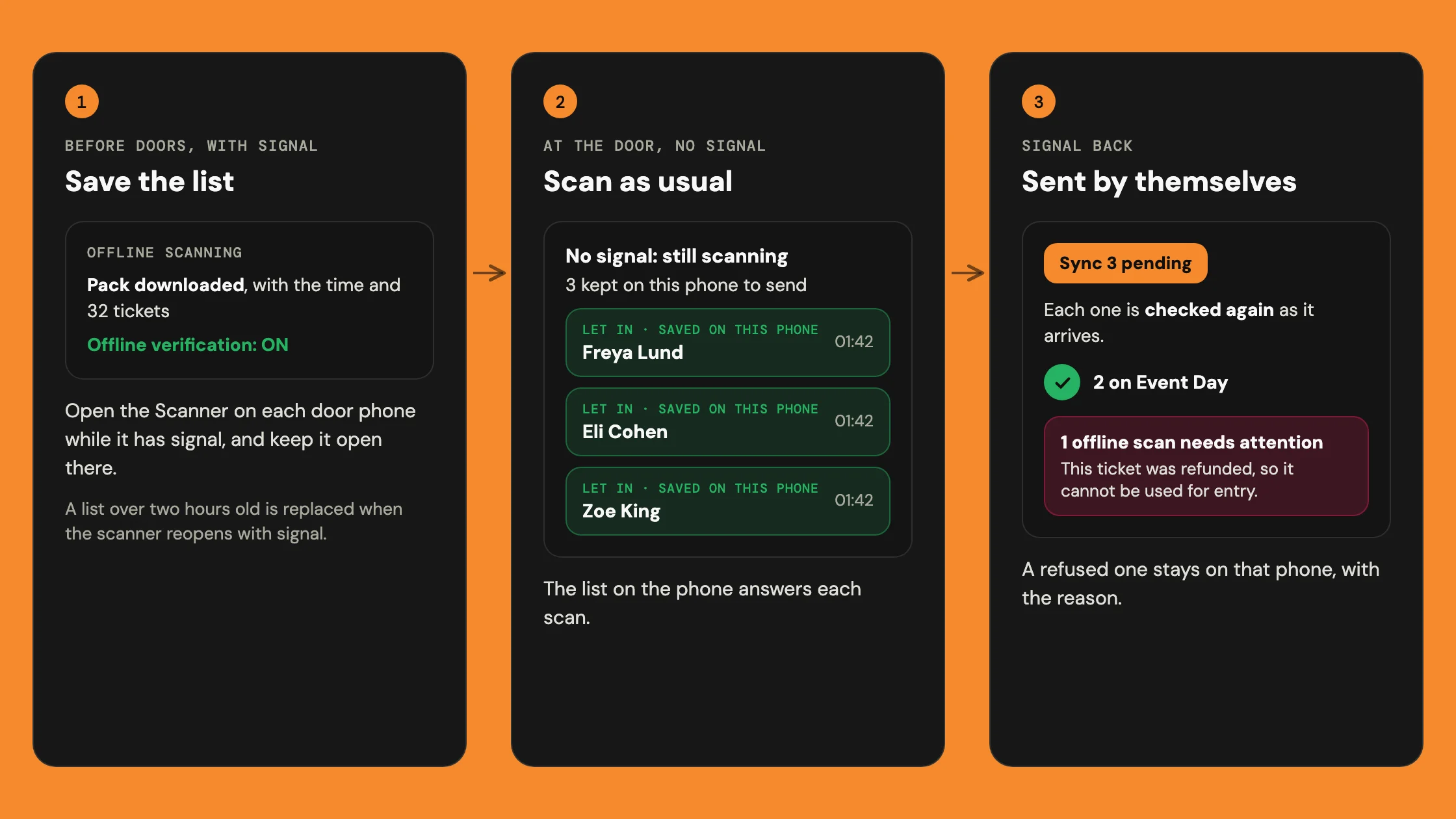
With no signal, the scanner checks tickets against a list saved on the phone. It keeps each check-in and sends it when the signal returns.
How do I get a phone ready before doors open?
Open Scanner on each door phone while it still has signal. Look for the Offline scanning panel at the foot of the page. Wait until it shows Pack downloaded, with a time and a ticket count, and Offline verification: ON. That's the saved list, and the phone is ready. Then keep the scanner open on that phone. If it says Offline verification: not on this phone, use another phone on the door: this one can't check tickets without signal.
The list doesn't update while the scanner stays open. Reopening the scanner with signal replaces a list over two hours old. Opening Hubbaly with signal saves a fresh list for up to three events in the next 24 hours.

What does the scanner show with no signal?
When the phone knows it has no signal, the top row reads No signal: still scanning. Under it, you'll see how many check-ins are kept on the phone.
On a weak signal, the scanner waits a few seconds, then uses the list. A good ticket shows the green Let in screen with Saved on this phone. Recent scans on this device marks it saved on this phone until it's sent.

Which tickets does it still turn away?
The saved list knows what was true when it was saved, and what this phone has done since.
- Refunded or cancelled before the list was saved
- Not valid.
- An old code from a ticket passed on before the list was saved
- Not valid.
- A code the phone can't read
- Not valid.
- Already let in on this phone
- Already in.
- Checked in before the list was saved, on an event with one date
- Already in.
- Bought after the list was saved
- Not checked, as it isn't on the list.
- Refunded or passed on after the list was saved, or forms not signed
- Let in, then flagged once it's sent.
What happens to saved check-ins when the signal returns?
They go by themselves when the phone reconnects, or when the scanner comes back on screen. A later scan that gets an answer sends them too. To send them yourself, press Sync in the Offline scanning panel, which shows how many are waiting, such as Sync 3 pending. Once sent, they show on Event Day.
Hubbaly checks each one again as it arrives. A refused one, such as a ticket refunded meanwhile, stays on that phone. It's listed under offline scans need attention, with the reason. It isn't sent again, so check with the person.
A transfer or refund request still waiting is tried again later. If another phone already let that ticket in, it simply counts as sent.

What it cannot do
- See refunds, transfers or new sales made after the list was saved.
- Check required forms. The saved list holds nothing about them.
- See scans made on other phones until they reconnect.
- Search by name, or check someone in from search.
- Note a return. Let back in turns green but says No signal: not noted.
- Show Event Day, which needs a connection.