




Check-in
Scan results
Every scan fills the phone's screen with one answer in one colour. Green means let them in. Orange and red mean read the words first.
What does each result on the scanner mean?
Each result says it in words as well as colour, so nobody has to rely on the colour alone.
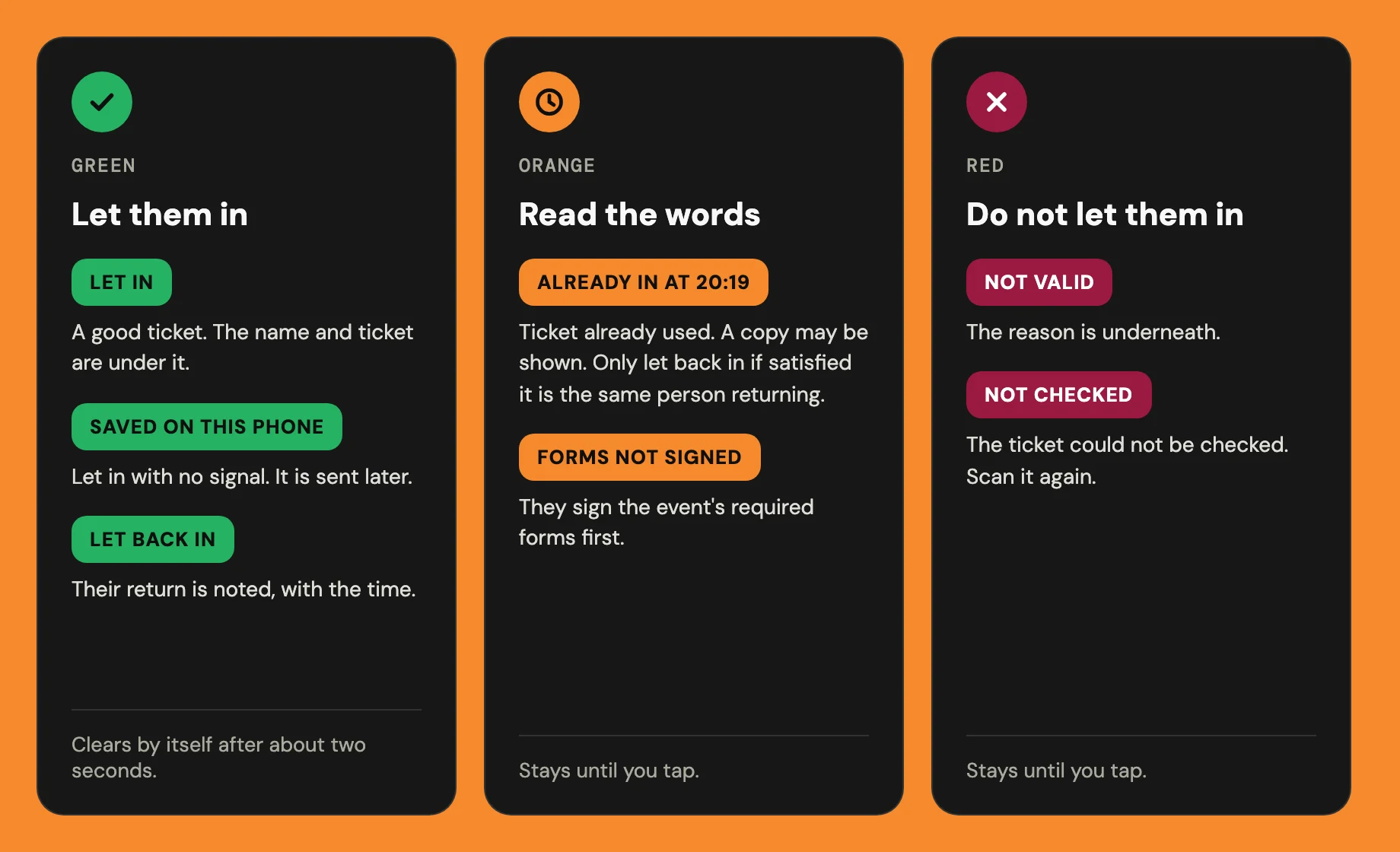
Orange and red screens stay until you tap. The camera reads nothing new meanwhile.
On Let in, a little celebration leaves the screen and lands on their ticket. To keep a phone still, turn off Celebrate each check-in under Recent scans on this device.
What if a ticket has already been used?
Already in means this ticket has already been checked in, at the time shown. That warning helps staff stop two people using the same QR code. Someone else may be showing a copy; the code alone cannot tell you whether this is the same person returning.
A single-date pass shows Welcome in. instead of its QR code once it receives the check-in. If the returning person has no code to show, find their ticket by name or reference in manual search. An older screenshot or a phone that has not received the check-in can still show a code; a pass covering more dates may also keep its code for those dates.
Only choose Let back in if you're satisfied this is the same person returning. The screen turns green and shows Back in at, with the time. A confirmed return is noted without counting the ticket twice; the next scan shows earlier recorded returns. With no signal it says No signal: not noted; if the reply is lost it says Return not confirmed. Undo removes a return pressed by mistake.

Why was a ticket turned away?
The line under Not valid gives the reason. These are the usual ones:
- Refunded or cancelled
- The ticket can't be used for entry any more.
- QR is out of date (transferred)
- It's an old code. The ticket now belongs to someone else.
- Pending transfer
- A transfer is waiting for the new holder to accept.
- Queued refund request
- The holder has asked to return it for a refund, and that's still open.
- Not valid for the time being scanned
- The ticket doesn't cover the date you're scanning.
- Invalid QR signature
- It isn't a ticket for this event.

How do I undo a check-in I got wrong?
Press Undo check-in on the green screen. It also stays on the strip below, but only for the last person let in on that phone. An Already in screen has no undo. If it then says Undo not confirmed, the phone couldn't reach Hubbaly, so press Undo check-in again.
On an event with several dates, it undoes only the date you're scanning. Once the scanner closes, four hours after the event ends, it can't be undone there.

Can I check someone in without scanning?
Yes. The scanner opens on search, ready for a desk. Search by name, @username or ticket ref, then press Check in.
With the box empty, an event under 1,000 tickets lists up to 25 people not yet checked in, under Ready for manual check-in. A ticket already checked in shows In at and the time, with Let back in. Only choose it if you're satisfied this is the same person returning; finding the ticket by name or reference does not prove that.
It runs the same checks as a scan, but it needs signal. Use camera switches to scanning, and Manual check-in switches back.

What it cannot do
- It can't let in a ticket with unsigned required forms. There's no override at the door.
- It can't check in a ticket for a date it doesn't cover.
- It can't undo an earlier check-in once someone else has been scanned.
- It can't undo a check-in once the scanner has closed.
- It can't search for people without signal.
- It forgets Recent scans on this device when you leave the session.
- It can't treat an Event shop code as a ticket. It says Not an admission ticket, and asks for their entry ticket.